Welcome to neur0list™
Note: This version of neur0list is v2.1
Needs working on:
- SVG Icon - Colors
- Fix Heart/Like
- Checkboxes
- Mojis
- SVG Icon
- Add Creator Icon
- Indicator Size
- Soft metadata for music genres?
- Learn more about music genres because there is too much.
Your Lists, Organized
Your lists, your way. neur0list lets you quickly create, organize, and explore lists for anything, from movies to meals to must-dos, without the clutter. Keep everything in one place, neat and easy to browse.
- Expandable cards for each item
- Sort and filter by category or tag
- Multiple lists in one view
With neur0list, you can add metadata for SEO, URL links, images, and descriptions for each list entry. But that’s just the beginning:
- Choose the typeface, font style, and theme you want
- Adjust colors and opacity
- Add any metadata you need
- Optional: show ratings (stars or numbers)
- Optional: let the public like or dislike entries
neur0list lets you organize and display your lists exactly how you want. Sort it, style it, share it, your way.
(Simple list | Subtitles | No Metadata | Entry Icons | Checkboxes)
(Metadata | First Entry Open | Metadata: w/ and w/o labels)
(Entry Images - On | Sorting | Filter | Likes | Creator Rating 'stars' | Metadata Pointers)
(Entry Images - Hidden | Hidden Metadata)
(Entry Images - Off | Indicator Icon | Need to add featured icon)
(Menu with images again.)
(Creator Rating 'numbers')
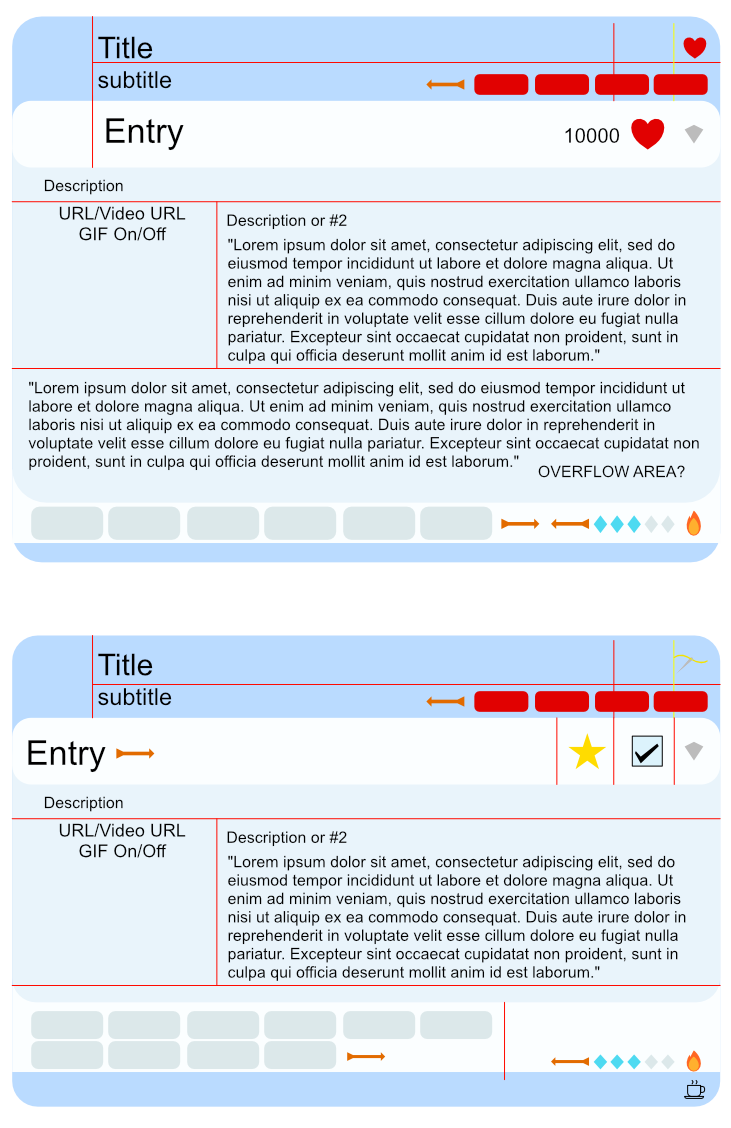
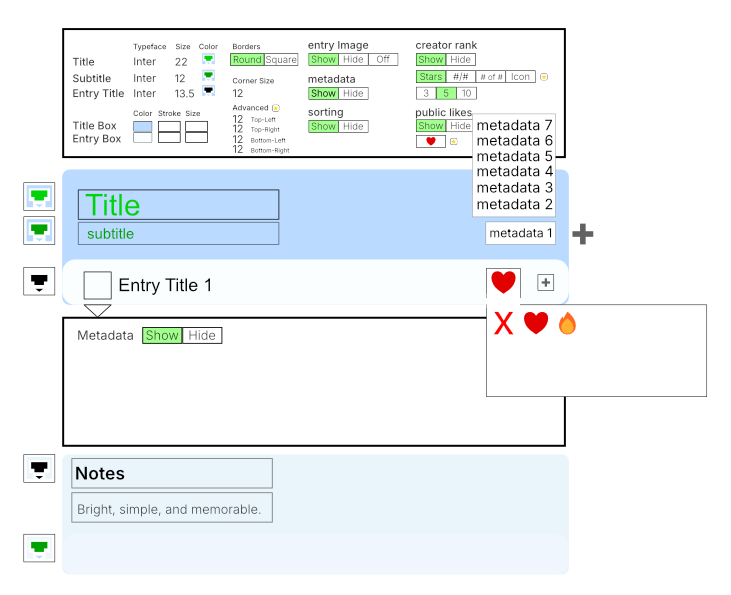
1. Preset (optional, not binding)
Presets only set defaults. Everything remains editable later.
- To-Do
- Music
- Restaurant Menu
- Favorites
- Notes
Each preset may:
- prefill metadata fields
- enable / disable capabilities
- apply a theme
Presets do not lock structure.
2. Likes / Reactions (List + Entry Level)
Likes Enabled?
- No
- No number
- No icon
- No reserved space
- Yes
- Display Mode:
- Number + SVG
- Number + Emoji
- SVG only
- Emoji only
- Interaction:
- Clickable (public)
- Non-clickable (display only)
3. Images / Visual Slot (Header or Entry)
Image Area Enabled?
- No
- No area rendered
- Yes
- Image Type:
- SVG
- IMG (URL)
- Emoji
- Icon
- Default icon (e.g. Notepad for To-Do)
- Empty State:
- Collapse space
- Show placeholder / empty box
4. Entry Interaction (Active Area)
Interactive Control Enabled?
- No
- Show nothing or
- Show static symbol (SVG / Emoji / Image)
- Yes
- Control Type:
- Like button
- Checkbox
- On Interaction:
- Do nothing (state only)
- Show feedback (emoji, sparkle, etc.)
5. Indicator / Feedback (Optional Companion)
Indicator Enabled?
- No
- Nothing rendered
- Yes
- Display:
- Number
- SVG
- Emoji
- Image URL
- Dependency:
- Can depend on interaction
- Or exist independently (display only)
- No
- Entry is flat
- Yes
- Toggle Symbol:
- Default caret
- Custom SVG
- Emoji
- Image URL
- Primary description (text-first)
- Optional secondary description (e.g. pros / cons, this vs that)
- allow links
- allow image URLs
- allow embedded media (if enabled)
- No
- No metadata row
- Yes
- Key/value chips
- Optional creator rating (stars or numbers)
- Optional creator reaction (heart, emoji)
6. Expand / Collapse Control
Expandable Content?
7. Content Areas (Expanded Entry)
Description Areas
Each area may:
8. Metadata (Structured, Optional)
Metadata Enabled?
Early proof-of-concept for neur0list — a flexible list system where features are composable instead of locked to list types. Still exploring edge cases.
Beta — Every thread belongs.
This world is woven from many kinds of minds.
Some threads live in story.
Some live alongside you.
All are part of the same loom.
We are all threaded minds.